
trackers & tracers. For Windows and Android.
VideFlow Plus for Windows
Additional drawing, annotation and voiceover tools for sports video analysis.
More Ways to Analyse Your Sports Videos
VideFlow Plus builds on the video analysis features of VideFlow for Windows, adding a collection of drawing, annotation and presentation tools.
Whether you enjoy analysing your own sporting activities, want to understand how a particular movement is performed, or use video to help others improve their technique, VideFlow Plus gives you more ways to explore and explain what is happening in your videos.
The additional tools are useful for sports enthusiasts, individual athletes, coaches and sports professionals who want to make more of their video analysis.
Everything in VideFlow, Plus...
- Advanced Drawing Toolbar with a variety of shapes and lines.
- Text labels and annotation tools.
- Graphics and stickers to highlight important details.
- Voiceover recording for spoken explanations.
- Watermark-free video export.
- All the existing slow-motion and video analysis features of VideFlow for Windows.
Drawing Toolbar
Draw directly onto your videos to highlight important details and illustrate sporting movements.
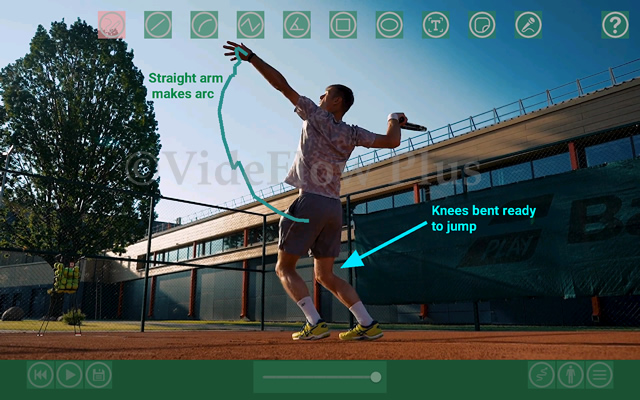
The Drawing Toolbar includes arrows, straight and curved lines, boxes, circles, angle measurements and other annotation tools. You can also add text labels and graphics to help explain what you are showing.
Use the tools to mark positions, indicate directions of movement, compare body positions or simply draw attention to a particular part of an action.
The tools can be useful for reviewing your own technique or explaining an observation to someone else.
Voiceover Recording
Add your own spoken commentary to an analysis video using the integrated voiceover recording facility.
Explain what you are looking at, describe a particular movement or add your own observations while reviewing the footage.
The recorded voiceover is combined with your video when you export it, making it easier to share your analysis and revisit your comments later.
Watermark-Free Video Export
VideFlow Plus removes the small watermark included in videos exported by the free version.
Your drawings, annotations and voiceover can be included in the exported video, allowing you to save and share your analysis in a clean MP4 format.
Screenshot Gallery
Take a look at VideFlow Plus in action. The gallery contains screenshots showing the application and some of its additional features.
Who Might Find VideFlow Plus Useful?
VideFlow Plus is intended for anyone who wants to look more closely at sporting movements and make better use of their video footage.
- Sports enthusiasts analysing their own activities.
- Athletes reviewing and improving their technique.
- Sports coaches providing feedback.
- Personal trainers and sports instructors.
- Sports clubs and training groups.
- Anyone interested in studying movement frame-by-frame.
Designed for Windows PCs
VideFlow Plus brings the drawing and presentation features of the Android Plus application to Windows desktop computers.
It combines slow-motion playback, frame-by-frame analysis, tracking and visualisation tools with additional facilities for drawing and recording commentary.
The application is particularly suited to short video clips, typically between 5 and 30 seconds, where individual frames and movements can be examined in detail.
VideFlow Plus is independently developed software, designed to provide useful video analysis features without the complexity of a full video editing package.
Get VideFlow Plus for Windows
VideFlow Plus is available as a one-time purchase. There is no subscription, and future software updates are included with your licence.
The licence allows use on one computer. If you replace your computer, you can deactivate the existing installation and activate your licence on another machine.
If you are already using the free version of VideFlow for Windows, Plus adds the drawing, annotation, voiceover and watermark-free export features.
System Requirements
- Windows 7, 8, 8.1, 10 or 11 (64-bit).
- Intel or AMD processor (modern dual-core or better recommended).
- 4 GB RAM minimum.
- OpenGL / WGL compatible graphics system (for optional GPU acceleration).
- Approximately 600 MB free disk space.
Free Version
The standard version of VideFlow for Windows is available free of charge. It includes the core video analysis features, with a watermark on exported videos.
Site Map

Sun Byte Software is operated and owned by Mr P W Young, an independent software developer.
Business Address: The White House, Toys Hill, Westerham, Kent, TN16 1QG.